Description
Audio Splitter & Converter
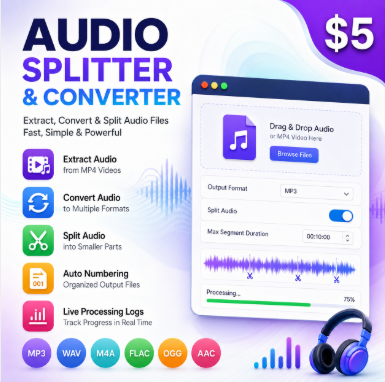
Extract audio from MP4 videos, convert audio into multiple formats, and split large recordings into smaller segments automatically with a fast and clean desktop workflow.
✅ What This Software Does
Audio Splitter & Converter helps you process audio files quickly without using complicated editing software. Extract audio from MP4 videos, convert between multiple audio formats, and split long recordings into smaller numbered segments automatically.
Extract Audio
Pull audio directly from MP4 video files and export it into your preferred audio format.
Convert Formats
Convert audio files between MP3, WAV, AAC, FLAC, OGG, M4A, and more.
Split Large Audio
Automatically divide long recordings into smaller parts using custom duration settings.
Responsive Processing
Background threaded processing keeps the interface smooth during heavy exports.
🚀 Why Buyers Love It
- Extract audio from videos in seconds
- Convert audio collections into optimized formats quickly
- Split podcasts and long recordings automatically
- Generate organized numbered export files
- Monitor progress with live processing logs
- Use professional FFmpeg processing with a simple GUI
- Work locally on your Windows computer
👥 Who This Is Useful For
🎙️ Podcasters
Split long podcast episodes into smaller upload-ready chunks automatically.
📹 Content Creators
Extract and reuse audio from videos for Shorts, Reels, YouTube, and social content.
🎧 Audio Engineers
Convert and organize audio libraries into multiple delivery formats efficiently.
📝 Transcribers
Break large recordings into manageable pieces for faster transcription workflows.
🧩 How It Works
- Select an audio or MP4 file
- Choose the output folder
- Select your export format
- Enable or disable audio splitting
- Set the maximum chunk duration
- Start processing with live status logs
- Receive automatically generated numbered output files
🎛️ Features Breakdown
| Feature | What it means for you | Icon |
|---|---|---|
| MP4 audio extraction | Convert video audio into standalone audio files | 🎬 |
| Audio conversion | Export files into multiple professional formats | 🎵 |
| Automatic splitting | Divide long audio into equal duration segments | ✂️ |
| Background processing | Keeps the interface responsive during export | ⚡ |
| Live status logs | Track processing progress in real time | 📊 |
🧠 Processing Behavior Explained
🎬 MP4 Input
The app extracts the audio stream from MP4 video files and converts it into your selected output format.
✂️ Audio Splitting
Long recordings are automatically divided into numbered chunks using your chosen segment duration.
📦 Organized Exports
Exported files are automatically named and organized for cleaner workflows and faster delivery.
📂 Supported Formats
🎵 Input Formats
- MP3
- WAV
- M4A
- FLAC
- OGG
- AAC
- WMA
- MP4
📤 Output Formats
- MP3
- WAV
- FLAC
- OGG
- AAC
- M4A
⚙️ Technology
Built with Python Tkinter using FFmpeg and Pydub for reliable desktop audio processing.
❓ Frequently Asked Questions
Does it work offline?
Yes. Everything runs locally on your Windows computer.
Can I extract audio from videos?
Yes. MP4 video audio can be extracted and exported into multiple formats.
Can I split large recordings?
Yes. Set a custom chunk duration and the app automatically creates numbered segments.
Do I need editing experience?
No. The interface is simple and beginner friendly.
🎧 Ready to Process Audio Faster?
Stop wasting time with complicated editing software. Extract, convert, and split audio files automatically using a clean professional desktop workflow.
Add this product to your cart to get started.
Reviews
There are no reviews yet.