
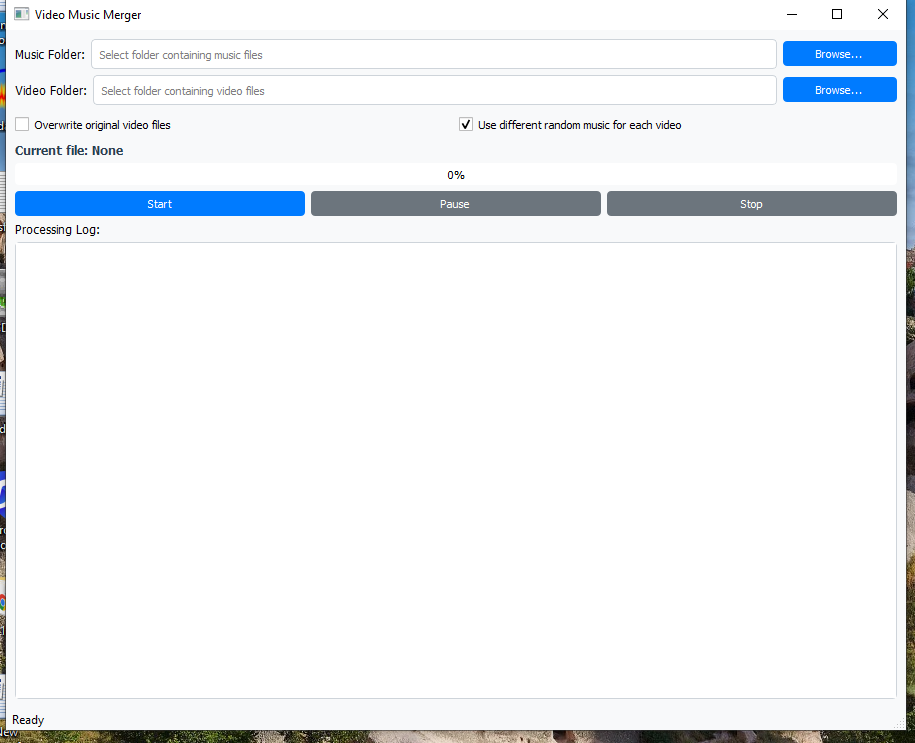
Description
Video Music Merger
Add background music to videos automatically in bulk. Perfect looping, clean output, and a simple interface built for speed.
✅ What This Software Does
Video Music Merger scans one folder of videos and one folder of music files, then automatically merges them.
For each video, it selects a music track, loops it smoothly to match the exact video duration, and exports a finished video ready to upload.
Silent videos
Adds looping background music when the video has no audio stream.
Videos with audio
Mutes the original audio and replaces it with background music at a smooth volume level.
Bulk processing
Processes entire folders automatically with progress tracking and logs.
Keeps video quality
Copies the video stream while adding audio, so output stays crisp and fast to generate.
🚀 Why Buyers Love It
- Save hours by removing manual timeline editing
- Keep every video engaging with consistent background music
- Make content feel unique with random track selection per video
- Get reliable results using the professional FFmpeg engine
- Work locally on your computer with full control of files
👥 Who This Is Useful For
📱 Content creators
Perfect for Shorts, Reels, TikTok style clips, compilation content, and faceless channels.
🧑💼 Social media managers
Batch process client videos fast, maintain a consistent vibe, and meet deadlines easily.
🛍️ Ecommerce sellers
Add background music to product videos for ads, store pages, and marketplace listings.
🎥 Agencies and editors
Automate repetitive steps so you can focus on creative work and scaling delivery.
🧩 How It Works
- Select your Music Folder containing audio tracks
- Select your Video Folder containing videos to process
- Choose output mode: overwrite originals or save to a safe output folder
- Click Start and let the app process everything automatically
- Watch progress, current file name, and logs in real time
🎛️ Features Breakdown
| Feature | What it means for you | Icon |
|---|---|---|
| Bulk folder processing | Process entire collections of videos in one run | 📦 |
| Random music selection | Each video can get a different track automatically | 🔀 |
| Loop music to match duration | No silence at the end and no cut off music | ♾️ |
| Mute existing audio when present | Replaces original sound with clean background music | 🔇 |
| Safe output option | Creates a separate output folder so originals stay untouched | 🛡️ |
| Pause, resume, stop | Control long batches anytime | ⏸️ ▶️ ⏹️ |
| Progress and logs | Know exactly what is happening and which file is processing | 📊 |
🧠 Output Behavior Explained
✅ If your video has audio
The app mutes the original audio and adds background music, then exports the final video with the same duration.
✅ If your video is silent
The app adds looping music directly and exports a finished video that feels alive and ready to publish.
📁 Output choices
Choose overwrite mode or safe output mode that saves to a separate folder named output_with_music.
📂 Supported Formats
🎞️ Video
- MP4
- MOV
- AVI
- MKV
- FLV
- WMV
- WebM
🎵 Audio
- MP3
- WAV
- OGG
- M4A
- FLAC
- AAC
⚙️ Engine
Powered by FFmpeg and FFprobe for professional, reliable media processing.
🧾 Requirements
- Windows computer
- FFmpeg installed and available in system path
- Music folder and video folder on your computer
🧰 Common Use Cases
📈 Ads and promos
Add consistent background music to product promos and marketing clips in bulk.
🎬 Faceless channels
Automate music addition for compilation content, quote videos, and slideshow style content.
🧑🏫 Training and internal videos
Add a subtle music bed to improve perceived quality across many videos.
🗂️ Client deliveries
Batch process folders and deliver uniform outputs fast without manual editing.
❓ Frequently Asked Questions
Does it work offline?
Yes. Everything runs locally on your computer using FFmpeg.
Will my original video quality change?
Video is copied while audio is added, so visuals stay sharp and processing stays fast.
Can I keep my original files safe?
Yes. Choose the safe output mode and the app saves results to output_with_music.
What if a video is very long?
The software loops music to match the video duration automatically.
Can I pause processing?
Yes. You can pause, resume, or stop anytime using built in controls.
Do I need editing skills?
No. If you can select folders and click Start, you can use it.
🛒 Ready to Batch Add Music to Your Videos?
Stop wasting time editing audio manually. Process videos in bulk, keep results consistent, and publish faster.
Add this product to your cart to get started.

Reviews
There are no reviews yet.